 mcpfold
mcpfold — one MCP config for every client
mcpfold is a free, open-source CLI that manages your MCP servers from one canonical config and folds it out to every MCP client — Claude Code, Claude Desktop, Cursor, VS Code, Windsurf, and Zed — each in its own format.
Curate each server’s tools to skip the context-window tax — every server dumps its full tool schema into context, used or not. Curating the toolset cuts tool-schema tokens by ~80% (7,476 → 1,497), with secrets kept as ${env:…} references, never hardcoded values.
npx mcpfold init
Feel the tax — and the savings
Pick your servers and how many tools each agent actually needs. Example servers from the published benchmark — no endorsement implied.
Manage every MCP server from one file
Write your MCP servers once in a single canonical mcp.config.jsonc — the source of truth mcpfold folds out to every client. Add, curate, and version your MCP config in one place instead of hand-editing a different file for each tool.
Works with every MCP client
mcpfold renders each client's own native format from one config, so the same MCP servers show up everywhere:
Curate tools, cut the context-window tax
Every MCP server dumps its full tool schema into the model's context whether you use those tools or not. mcpfold lets you allow- or deny-list tools per server, so only what you need loads — the committed benchmark shows the token savings.
Secrets as references, never values
Your MCP config carries ${env:…} / ${op:…} references instead of raw tokens, so nothing sensitive is ever written to a client config or committed to git. mcpfold resolves the reference at fold time, from your environment or secret manager.
How it works
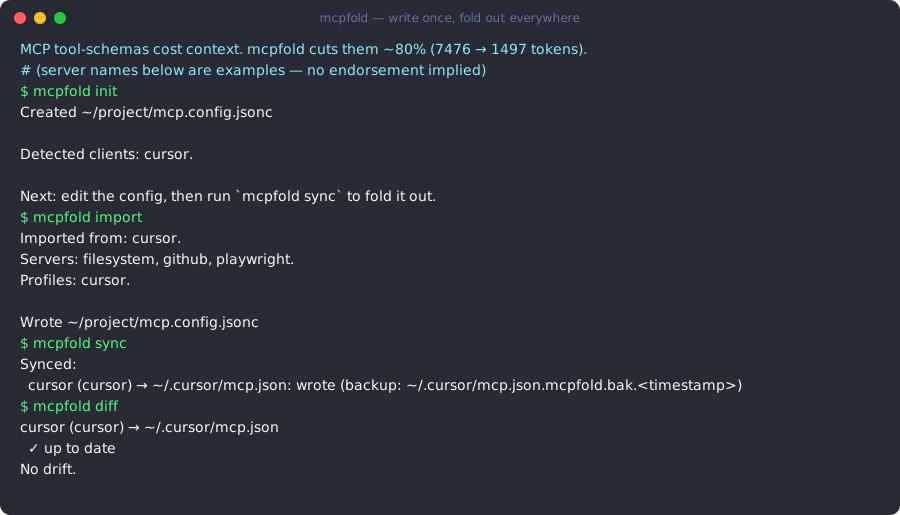
Four commands take you from scattered client configs to one source of truth, folded out everywhere.
mcpfold initCreate the canonical mcp.config.jsonc — one source of truth for every MCP server you run.
mcpfold initmcpfold importPull the servers already configured across your clients into the canonical config, secrets rewritten as references.
mcpfold importmcpfold syncFold the canonical config out to every client's native format — add a server once, it appears everywhere.
mcpfold syncmcpfold diffSee any drift between the canonical config and what each client currently has, before you sync.
mcpfold diff
Who mcpfold is for
Solo developers
Run the same MCP servers in Claude Code, Cursor, and VS Code without hand-editing three config files. Set it up once; every client stays in sync.
Install the CLI →Teams
Share one reviewed config, keep secrets as references, and see every change in an audit trail. The hosted cloud syncs it across the team.
See team cloud →Power users
Curate exactly the tools you want from a large directory of MCP servers, and cut the context-window tax on every model call.
Browse the directory →Free, open source, and MIT-licensed
- GitHub
- Latest on npm: v1.0.1
- MIT license
Explore mcpfold
- Install — npx, npm, Homebrew, or Scoop — no account needed.
- MCP server directory — browse and add community MCP servers.
- Documentation — config format, secrets, adapters, CLI contract.
- Pricing — free CLI (MIT); optional paid cloud for teams.
One config for every MCP client
Install the free, MIT-licensed CLI and fold your MCP servers out to every client — or add the hosted cloud when your team needs shared configs and an audit trail.
Frequently asked questions
- What is mcpfold?
- mcpfold is a free, open-source CLI that keeps one canonical config for your MCP (Model Context Protocol) servers and folds it out to every client — Claude Desktop, Claude Code, Cursor, VS Code, Windsurf, Zed, and more — each in its own native format. You write your servers once; mcpfold renders the right file for each tool.
- How does mcpfold handle secrets?
- mcpfold stores secrets as references (for example ${env:GITHUB_PAT} or ${op:vault/item/field}), never as raw values. The reference is the only thing committed to git; the actual secret is resolved from your environment or secret manager at fold time, so credentials are never written to a client config on disk.
- Which MCP clients does mcpfold support?
- mcpfold folds to 12 clients from one config: Claude Desktop, Claude Code, Cursor, VS Code, Windsurf, Zed, Cline, Gemini CLI, JetBrains AI Assistant, Visual Studio, Continue, and Roo Code. Each client has its own config format and path; mcpfold handles the per-client dialect automatically.
- Is mcpfold free?
- Yes. The entire mcpfold CLI — every adapter, the canonical config, secret references, sync, diff, doctor, and the config-as-code CI gate — is free and open source under the MIT license, with no account required. Optional paid cloud features add team config sharing, roles, and an audit trail.