 mcpfold
◆mcpfold.yaml — one source of truth
servers:
  github: { tools: [create_issue, get_pr] }
supabase: { tools: [query, insert] }mcpfold is a free, open-source CLI that manages your MCP servers from one canonical config and folds it out to all 18 supported MCP clients — Claude Code, Cursor, VS Code, Windsurf, Zed, and more — each in its own format.
Curate each server’s tools to skip the context-window tax — every server dumps its full tool schema into context, used or not. Curating the toolset cuts tool-schema tokens by ~80% (7,476 → 1,497), with secrets kept as ${env:…} references, never hardcoded values.
npx mcpfold init
servers:
github: { tools: [create_issue, get_pr] }
supabase: { tools: [query, insert] }mcpServers: {
github: {…}
supabase: {…}
}mcpServers: {
github: {…}
supabase: {…}
}mcpServers: {
github: {…}
supabase: {…}
}servers: {
github: {…}
supabase: {…}
}mcpServers: {
github: {…}
supabase: {…}
}context_servers: {
github: {…}
supabase: {…}
}
Pick your servers and how many tools each agent actually needs. Example servers from the published benchmark — no endorsement implied.
Tokens use the 1-token≈4-chars approximation for instant estimates. The benchmark publishes exact GPT and Claude counts that land within a few percent.
Write your MCP servers once in a single canonical mcp.config.jsonc — the source of truth mcpfold folds out to every client. Add, curate, and version your MCP config in one place instead of hand-editing a different file for each tool.
mcpfold renders each client's own native format from one config, so the same MCP servers show up everywhere:
Every MCP server dumps its full tool schema into the model's context whether you use those tools or not. mcpfold lets you allow- or deny-list tools per server, so only what you need loads — the committed benchmark shows the token savings.
Your MCP config carries ${env:…} / ${op:…} references instead of raw tokens, so nothing sensitive is ever written to a client config or committed to git. mcpfold resolves the reference at fold time, from your environment or secret manager.
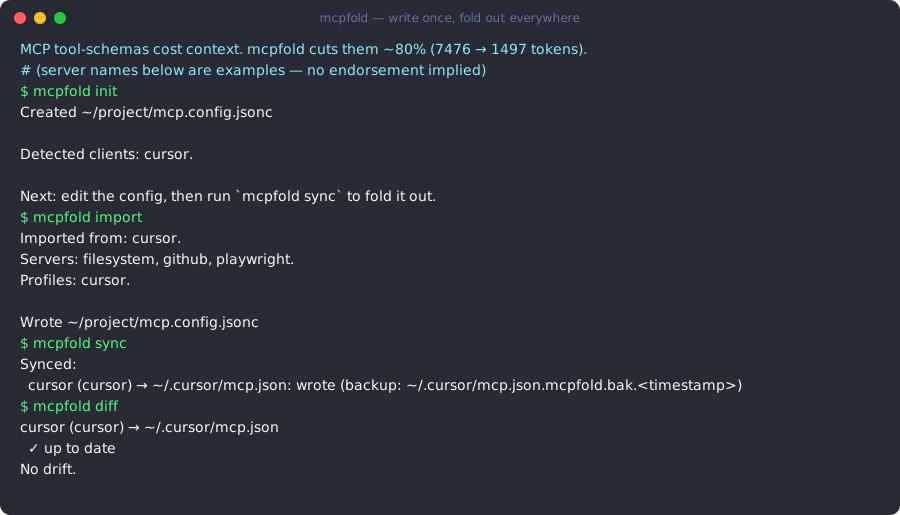
Four commands take you from scattered client configs to one source of truth, folded out everywhere.
mcpfold initCreate the canonical mcp.config.jsonc — one source of truth for every MCP server you run.
mcpfold initmcpfold importPull the servers already configured across your clients into the canonical config, secrets rewritten as references.
mcpfold importmcpfold syncFold the canonical config out to every client's native format — add a server once, it appears everywhere.
mcpfold syncmcpfold diffSee any drift between the canonical config and what each client currently has, before you sync.
mcpfold diffRun the same MCP servers in Claude Code, Cursor, and VS Code without hand-editing three config files. Set it up once; every client stays in sync.
For solo developers →Share one reviewed config, keep secrets as references, and see every change in an audit trail. The hosted cloud syncs it across the team.
For teams →Curate exactly the tools you want from a large directory of MCP servers, and cut the context-window tax on every model call.
For power users →Install the free, MIT-licensed CLI and fold your MCP servers out to every client — or add the hosted cloud when your team needs shared configs and an audit trail.
New adapters, releases, and the cloud waitlist. No spam, unsubscribe anytime.